
The Role of Terraform in Modern DevOps
Infrastructure as Code (IaC) is the backbone of modern DevOps, basically, and Terraform by HashiCorp is the industry standard for provisioning and managing cloud resources. Unlike configuration management tools that mutate existing infrastructure, Terraform uses a declarative approach to define the desired end state of your environment, you know?
In production, Terraform is not just about writing code; it is about establishing governance, reproducibility, and safe collaboration across engineering teams, trust me.
Whether you are provisioning EKS clusters, VPC networks, or IAM roles, following established best practices prevents costly outages, security breaches, and "works on my machine" syndrome, which is a huge relief, honestly.
Remote State Management and Locking
The Terraform state file (terraform.tfstate) is the single source of truth mapping your configuration to real-world resources, seriously. Storing this locally is a critical anti-pattern for any team, basically.
              terraform {
  backend "s3" {
    bucket         = "my-org-terraform-state"
    key            = "prod/kubernetes/terraform.tfstate"
    region         = "us-east-1"
    encrypt        = true
    dynamodb_table = "terraform-state-locks"
  }
}
💡 Never Skip State Locking
Always configure a DynamoDB table (or equivalent) for state locking, honestly. This prevents concurrent terraform apply operations from corrupting your state file, which can lead to irreversible infrastructure damage, you know?
Embrace Modular Architecture
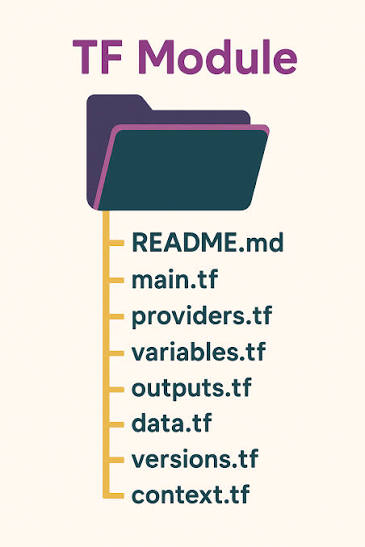
As your infrastructure grows, a monolithic main.tf file becomes unmaintainable, basically. Terraform modules allow you to encapsulate and reuse configurations, promoting the DRY (Don't Repeat Yourself) principle, trust me.
| Approach | Maintainability | Reusability | Risk of Error |
|---|---|---|---|
| Monolithic (Single File) | Low | None | High |
| Local Modules | Medium | Team-only | Medium |
| Remote Versioned Modules | High | Organization-wide | Low, basically |
              module "eks_cluster" {
  source  = "terraform-aws-modules/eks/aws"
  version = "~> 20.0"

  cluster_name    = "prod-eks-cluster"
  cluster_version = "1.30"

  vpc_id     = module.vpc.vpc_id
  subnet_ids = module.vpc.private_subnets

  # Enforce strict node group configurations
  eks_managed_node_groups = {
    primary = {
      instance_types = ["m6i.xlarge"]
      min_size       = 3
      max_size       = 10
      desired_size   = 3
    }
  }
}
Security and Secrets Management
Hardcoding credentials or sensitive outputs in Terraform is a severe security vulnerability, seriously. Terraform provides native mechanisms to handle sensitive data, but they must be paired with external secret managers, you know?
              variable "database_password" {
  description = "The master password for the database"
  type        = string
  sensitive   = true
}

output "db_endpoint" {
  value       = aws_db_instance.main.endpoint
  description = "The connection endpoint"
  sensitive   = false
}
Marking variables and outputs as sensitive = true prevents them from being displayed in CLI output, basically. However, the value still exists in the state file. For production, integrate Terraform with external secret managers (like AWS Secrets Manager or HashiCorp Vault) and use OIDC for provider authentication to eliminate long-lived cloud credentials, trust me.
"Treat your Terraform state file with the same level of security as your production database, honestly. It contains the blueprint and often the keys to your entire infrastructure, basically."
Automating Terraform with CI/CD
Manual Terraform executions are prone to human error, which is bad. A robust CI/CD pipeline enforces consistency, runs automated checks, and requires peer review before any infrastructure changes are applied, you know?
- ●
terraform fmt: Enforce consistent code formatting, basically.
- ●
terraform validate: Check for syntax and internal consistency, honestly.
- ●
tflint or tfsec: Run static analysis for security and best practice violations.
- ●
terraform plan: Generate an execution plan and post it as a Pull Request comment, which is super handy.
- ●
terraform apply: Execute only after manual approval on the main branch, seriously.
              name: Terraform CI/CD
on:
  pull_request:
    branches: [main]
    paths: ['infrastructure/**']

jobs:
  terraform:
    runs-on: ubuntu-latest
    defaults:
      run:
        working-directory: ./infrastructure
    steps:
      - uses: actions/checkout@v4

      - name: Setup Terraform
        uses: hashicorp/setup-terraform@v3
        with:
          terraform_version: 1.9.0

      - name: Terraform Format
        run: terraform fmt -check

      - name: Terraform Validate
        run: terraform validate

      - name: Terraform Plan
        run: terraform plan -out=tfplan
        # In a real setup, configure AWS OIDC credentials here
Frequently Asked Questions
How do I handle configuration drift in Terraform?
Should I use Terraform Workspaces for different environments?
How do I import existing infrastructure into Terraform?
What is the difference between terraform destroy and taint?
Conclusion
Mastering Terraform for production is a journey from writing simple scripts to architecting secure, modular, and automated infrastructure systems, trust me. By implementing remote state with locking, enforcing modular design, securing sensitive data, and integrating with CI/CD pipelines, you build a foundation that scales with your organization, honestly.
Start by auditing your current Terraform codebase against these best practices, basically. Even small improvements, like adding sensitive flags or implementing tflint in your CI pipeline, yield significant reductions in operational risk, you know?
Next Step: Combine this Terraform foundation with the ArgoCD GitOps workflow from our previous guide to achieve fully automated, end-to-end infrastructure and application delivery, basically.